## Data Type
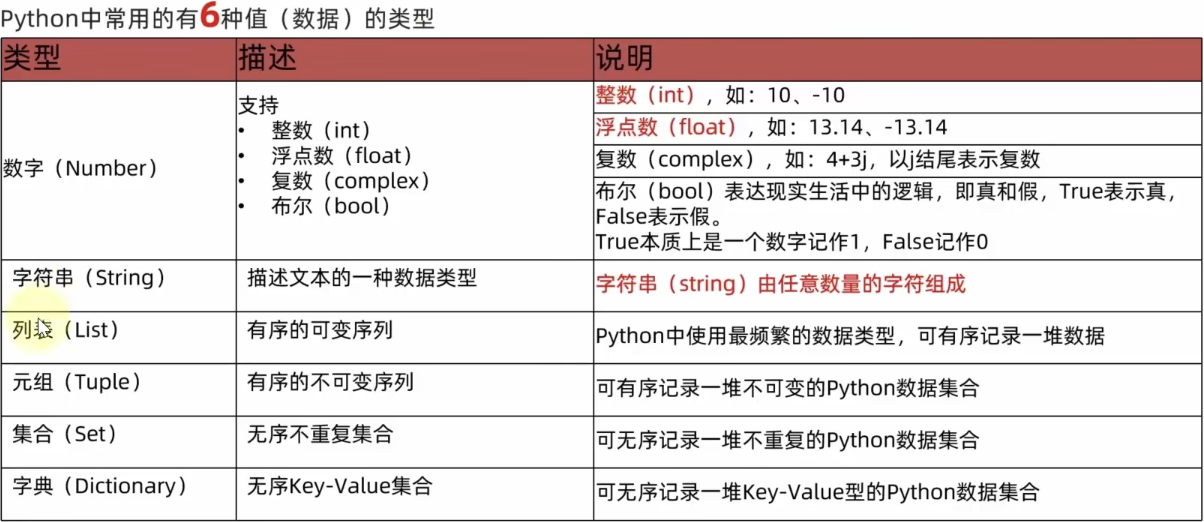
后 4 个是 python 的 built in data structure(数据结构),其中 tuple 和 list 是 python 独有的
1. **列表(List)**:
- 列表是有序的集合,可以包含任意类型的对象:数字、字符串、甚至其他列表。
- 列表是可变的,意味着可以在运行时增加、删除或改变元素。
- 使用方括号 `[]` 定义,元素之间用逗号分隔,例如 `[1, 2, 3]`
2. **元组(Tuple)**:
- 元组与列表类似,但是不可变。一旦创建,你不能修改元组中的元素。
- 使用小括号 `()` 定义,元素之间用逗号分隔,例如 `(1, 2, 3)`
- 由于其不可变性,元组可以作为字典键或集合元素。
3. **字典(Dictionary)**:
- 字典是一种映射类型,它存储 key- value,其中 key 是唯一的。
- 字典是无序的(在 Python 3.7 之前),但从 Python 3.7 起,字典记住了插入元素的顺序。
- 使用大括号 `{}` 定义,每个键值对以 `key: value` 的形式出现,对之间用逗号分隔,比如 `{"name": "Gina", "age": 25}`
4. **集合(Set)**:
- 集合是一个无序的元素集,自动去除重复元素。
- 集合中的元素必须是不可变的,但集合本身是可变的,你可以添加或删除元素。
- 使用 `set()` 函数或大括号 `{}` 定义(但空集合只能用 `set()` 定义,因为空大括号 `{}` 用来定义空字典),比如 `{1, 2, 3}`
## Operator
### Arithmetic Operator
| Operation | Operator | Description | Usage |
| -------------- | -------- | ------------------------------------------------------------------------------ | -------------------- |
| Addition | `+` | Adds two numbers together. | A add B |
| Subtraction | `-` | Subtracts one number from another. | A minus B |
| Multiplication | `*` | Multiplies two numbers. | A times B |
| Division | `/` | Divides two numbers, returns a float result. | A divided by B |
| Floor Division | `//` | Divides two numbers, returns an integer result by discarding the decimal part. | A floor divided by B |
| Modulus | `%` | Divides two numbers, returns the remainder. | A mod B |
| Exponentiation | `**` | Raises one number to the power of another. | A to the power of B |
samples:
```python
# 加法
result = 3 + 2 # 结果为 5
# 减法
result = 3 - 2 # 结果为 1
# 乘法
result = 3 * 2 # 结果为 6
# 除法
result = 3 / 2 # 结果为 1.5
# 整除
result = 3 // 2 # 结果为 1
# 取余
result = 3 % 2 # 结果为 1
# 指数
result = 3 ** 2 # 结果为 9
```
Python 的算术表达式还支持组合使用这些运算符,并使用括号 `()` 来指定计算的顺序。
#### 复合赋值运算符
Python 还提供了一系列复合赋值运算符,如 +=、-=、`*=`、/= 等,这些运算符用于更新变量的值,同时执行一个算术运算。
```python
counter = 1
counter += 1 # 等同于 counter = counter + 1
print(counter) # 输出: 2
```
### Relational Operators
| Operator | Description |
|----------|----------------------|
| < | Less than |
| > | Greater than |
| <= | Less than or equal to|
| >= | Greater than or equal to |
| == | Equal to |
| != | Not equal to |
### Logical Operators
- **`and`**:如果两个布尔值都为 `True`,则返回 `True`;否则返回 `False`。
- **`or`**:如果至少有一个布尔值为 `True`,则返回 `True`;如果都为 `False`,则返回 `False`。
- **`not`**:对布尔值取反。如果是 `True` 变为 `False`,如果是 `False` 变为 `True`。
```python
# 定义两个布尔变量
A = True
B = False
# 与运算
print('A and B is', A and B) # 结果为False,因为B是False
# 或运算
print('A or B is', A or B) # 结果为True,因为至少A是True
# 非运算
print('not A is', not A) # 结果为False,因为A是True
```
### Bitwise Operators
| Operator | Description | Example |
| -------- | ----------- | ------------ |
| `&` | AND | `5 & 3 = 1` |
| ` | OR | 按位或 |
| `^` | XOR | `5 ^ 3 = 6` |
| `~` | NOT | `~5 = -6` |
| `<<` | 左移位 | `2 << 1 = 4` |
| `>>` | 右移位 | `4 >> 1 = 2` |
### Compound Assignment Operators
A compound assignment operator combines a binary operator with the assignment operator = into a single operator.
- 支持
- Arithmetic Operators
- `+=` → addition
- `-=` → subtraction
- `*=` → multiplication
- `/=` → division
- `//=` → floor division
- `%=` → modulo
- `**=` → exponentiation
- Bitwise Operators
- `&=` → bitwise AND
- `|=` → bitwise OR
- `^=` → bitwise XOR
- `<<=` → bitwise left shift
- `>>=` → bitwise right shift
#### 逻辑运算符的短路行为
Python 中的逻辑运算符 `and` 和 `or` 具有短路行为,这意味着它们在评估表达式时,一旦结果确定,就会停止评估剩余的表达式。
- 对于使用 `and` 运算符的表达式,如果第一个操作数的结果是 `False`,那么整个表达式的结果一定是 `False`,因此不需要再计算第二个操作数。
- 对于使用 `or` 运算符的表达式,如果第一个操作数的结果是 `True`,那么整个表达式的结果一定是 `True`,因此不需要再计算第二个操作数。
```python
# 使用 and 的短路行为
a = None
b = 2
print(a and a.bit_length()) # a 是 None,所以 a.bit_length() 不会被调用,避免了 AttributeError
# 使用 or 的短路行为
c = a or b # 由于 a 是 None,表达式的结果为 b 的值
print(c) # 输出: 2
```
### 成员关系运算符
- **`in`**:检查一个元素是否存在于某个序列(如列表、元组、字符串等)或集合中。如果存在,返回 `True`。
### 身份运算符
- **`is`**:检查两个对象是否是同一个对象(即,他们在内存中的地址是否相同)。如果是,返回 `True`。
- **`is not`**:检查两个对象是否不是同一个对象(即,他们在内存中的地址是否不同)。如果不是,返回 `True`。
### 组合使用
这些运算符和语法结构可以组合使用,以构造复杂的逻辑和条件表达式,从而满足各种编程需求。例如,你可以将 `in` 与 `not` 一起使用来检查一个元素是否不在某个序列中,或者使用 `and`、`or` 以及 `not` 来组合多个条件判断。
```python
names = ["Alice", "Bob", "Charlie"]
if not "Dave" in names:
print("Dave 不在列表中")
```
## Control Flow
- if / elif / else
- while
- for
- **`break`**: 用于立即退出循环,不管循环条件是否仍为 True。
- **`continue`**: 跳过当前循环的剩余部分,直接开始下一次迭代。
## Data Structure
### Sequences
- A sequence is an ordered collection of items that supports **indexing, slicing, and iteration**.
- it includes
- string
- list
- tuple
#### use range to generate
`for` loop + `range()` to generate a numeric sequence in a specific range
```python
for i in range(5):
print(i)
#1 2 3 4 5
```
- `range(start, stop, step)`
- **start**(required):序列的起始值。
- **stop**(required):序列的结束值,生成的序列不会包含此值。
- **step**(optional):两个数之间的间隔,默认值为 1。
```python
range(start, stop, step)
```
- 例子:生成一个从 0 开始到 10(不包括 10),每隔 2 个数的序列
```python
for i in range(0, 10, 2):
print(i)
```
这将输出:
```
0
2
4
6
8
```
- 负步长
步长参数也可以是负数,这时候,序列会逆向生成,此时 `start` 应该大于 `stop`:
```python
for i in range(10, 0, -2):
print(i)
```
这将输出:
```
10
8
6
4
2
```
#### slice
```python
sequence[start:stop:step]
```
- `start`: 起始索引(包含)
- `stop`: 结束索引(不包含)
- `step`: 步长(可选,默认是1)
- special cases
1. 省略所有参数:`[:]` 选择整个序列。
2. 负数索引:可以使用负数索引从序列的末尾开始计数。例如,`-1` 是序列的最后一个元素。
3. 步长为负数:当 `step` 为负数时,切片将从序列的末尾向开始取元素。在这种情况下,`start` 应该大于 `stop` 的值,以便选择元素。例如,`[::-1]` 将反转序列。
4. 超出范围的索引:如果 `start` 或 `stop` 的值超出了序列的边界,Python 不会抛出错误。对于过大的索引,切片操作将被解释为序列的末尾。对于负数索引,如果其绝对值超出了序列长度,切片操作将从序列的开始处开始。
- examples
- 选择前三个元素:`a[:3]`
- 选择最后三个元素:`a[-3:]`
- 选择中间的元素,每隔一个取一个:`a[1:-1:2]`
- 反转整个序列:`a[::-1]
#### iteration
##### basic `for` iteration
- case
- when you only need to read/print the value
- grammar
```python
for element in sequence:
# do something
```
- examples
```python
nums = [1,2,3,1,1,3]
for num in nums:
print(num, end=" ")
print()
```
```python
text = "hello"
for char in text:
print(char)
```
```python
fruits = ['apple', 'banana', 'cherry']
for fruit in fruits:
print(fruit)
```
##### for + range + length
- cases
- when you need to modify the element in place
假设你有一个列表 `my_list`,你想将所有元素转换为大写。这个任务可以通过遍历索引来完成:
```python
my_list = ['apple', 'banana', 'cherry']
for i in range(len(my_list)):
my_list[i] = my_list[i].upper()
```
##### enumerate()
- cases
- when you need to read both index and value
```python
my_list = ['a', 'b', 'c']
for i, value in enumerate(my_list):
print(f"Index {i} has value {value}")
```
### List
#### CRUD
- create
- use `[ ]`
```python
fruits = ["apple", "banana", "cherry"]
```
- use List Comprehension
```python
squares = [i ** 2 for i in range(5)]
# [0, 1, 4, 9, 16]
```
- add
- at end (using `.append`)
```python
fruits = ["apple", "banana", "cherry"]
fruits.append("orange")
print(fruits) # print: ['apple', 'banana', 'cherry', 'orange']
```
- read (by index)
```python
fruits[1] = "banana"
```
- update (by index)
```python
fruits[0] = "orange"
```
- delete
### dict(Hash Table)
[[Hash Table]]
#### CRUD
- create and initialize
```python
d = {} # 空字典
d = {'a': 1, 'b': 2} # 初始化
d = dict() # 用 dict 函数
d = dict(a=1, b=2) # 用关键字参数初始化
```
- read (by key)
```python
value = d["a"]
# 或使用更安全的方式(键不存在时不会报错)
value = d.get("a") #不存在时会设为None
value = d.get("c", 0) # 设置默认value
```
- update(键存在则更新,键不存在则添加)
```python
d["a"] = 10
d["c"] = 3
```
- update 多个元素
```python
d.update({"d": 4, "e": 5})
```
- delete
```python
del d["a"] # 如果键不存在会报错
d.pop("b") # 如果键不存在会报错
d.pop("x", None) # 安全删除,键不存在时返回 None
```
#### iteration
1. iteration key
```python
for key in d:
print(key)
```
2. iteration value
```python
for value in d.values():
print(value)
```
3. iteration both
```python
for key, value in d.items():
print(key, value)
```
### set
#### CRUD
- Creat `set`
```python
s = set() # empty set
s = {1, 2, 3} # initialized with elements
```
⚠️ `s = {}` 是一个空字典,不是 set!
- Add element `.add`
```python
s.add(4) # adds 4 to the set
```
- **Check if exists**
```python
4 in s # True/False
```
- **Remove element**
```python
s.remove(2) # remove 2, if not exist → ❌ error
s.discard(2) # safe remove, if not exist → ✅ no error
```
- **Pop (removes arbitrary element)**
```python
s.pop() # randomly removes one element
```
- Clear
```python
s.clear() # make the set empty
```
#### Iteration
```python
for element in s:
print(element)
```
#### Set Operations (Often used in problems)
```python
a = {1, 2, 3}
b = {3, 4, 5}
a | b # union: {1, 2, 3, 4, 5}
a & b # intersection: {3}
a - b # difference: {1, 2}
a ^ b # symmetric difference: {1, 2, 4, 5}
```
## built-in functions
### Math
| Function | Description | Example |
| ------------- | ------------------ | --------------------- |
| `abs(x)` | 绝对值 | `abs(-3) → 3` |
| `max(a, b)` | 返回最大值 | `max(3, 5) → 5` |
| `min(a, b)` | 返回最小值 | `min(3, 5) → 3` |
| `sum(iter)` | 对可迭代对象求和 | `sum([1, 2, 3]) → 6` |
| `pow(x, y)` | 幂运算(等价于 `x ** y`) | `pow(2, 3) → 8` |
| `round(x)` | 四舍五入 | `round(3.6) → 4` |
| `divmod(a,b)` | 同时返回 `(a//b, a%b)` | `divmod(7,3) → (2,1)` |